Neither cable is better across the board. Cat6 wins on cost, simplicity and Power over Ethernet for runs under 100 meters. Fiber wins on speed, headroom, distance and immunity to interference. Most modern networks use both.
If you’re wiring a home, an office or a data center, the cable you pick sets your network’s limits for the next 10 to 20 years. Swapping cable inside walls and ceilings is expensive, so it pays to choose well the first time.
This guide explains how each cable works, compares them side by side, and tells you exactly when to choose one over the other.
What is Cat6?
Cat6 (Category 6) is a copper Ethernet cable with four twisted pairs of wire, ending in standard RJ45 connectors. It’s the same plug that fits almost every laptop, router, switch and smart TV.
The twisting cancels out much of the electrical noise between pairs. Many Cat6 cables also add a plastic spline down the middle to keep the pairs apart and cut crosstalk further.
Key specs:
- Bandwidth: up to 250 MHz
- Speed: 1 Gbps up to 100 m; 10 Gbps up to about 37–55 m
- Maximum run: 100 m (328 ft) per segment, including patch cords
- Power: supports Power over Ethernet (PoE), including high-power PoE++
Cat6 vs. Cat6a
Cat6a (“augmented”) doubles the bandwidth to 500 MHz and carries 10 Gbps over the full 100 m. It’s thicker, stiffer and costs more, but it’s the safer choice for new commercial installs where 10 Gbps to the desk or to Wi-Fi 6E/7 access points is on the roadmap.
What is fiber optic cable?
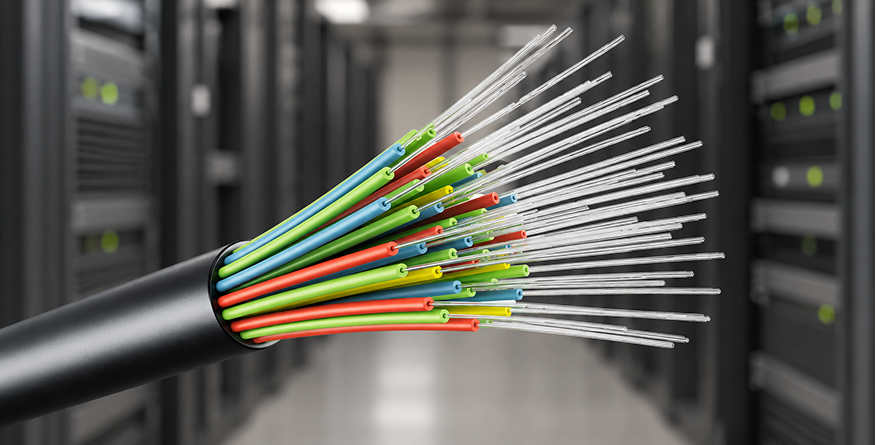
Fiber optic cable sends data as pulses of light through strands of glass or plastic thinner than a human hair. A laser or LED at one end switches on and off billions of times a second, and a receiver at the other end turns the light back into data.
Because it carries light rather than electricity, fiber doesn’t pick up electrical noise and loses very little signal over distance.
There are two main types:
| Type | Core size | Typical reach | Common use |
|---|---|---|---|
| Multimode (OM3, OM4, OM5) | 50 µm | 300–550 m at 10 Gbps; ~100–150 m at 100 Gbps | Inside buildings, data centers, campus backbones |
| Single-mode (OS1, OS2) | ~9 µm | 10 km to 80+ km | Between buildings, ISPs, FTTH, long-haul links |
Fiber connects with LC, SC or MPO connectors and needs transceivers (such as SFP+ or QSFP modules) or media converters to talk to standard network gear.
Fiber optic vs. Cat6 at a glance
| Factor | Cat6 | Fiber optic | Edge |
|---|---|---|---|
| Max speed | 10 Gbps (short runs) | 10, 40, 100, 400 Gbps and beyond | Fiber |
| Max distance | 100 m | 550 m (multimode) to 80+ km (single-mode) | Fiber |
| Cable cost | Low | Similar to slightly higher per meter | Cat6 |
| Total installed cost | Low | Higher (transceivers, termination, test gear) | Cat6 |
| Installation | Easy; DIY-friendly | Needs trained installers and special tools | Cat6 |
| Interference (EMI) | Susceptible near motors, power lines | Immune | Fiber |
| Security | Can be tapped via emissions | Very hard to tap undetected | Fiber |
| Power over Ethernet | Yes | No | Cat6 |
| Durability | Tough, tolerates bending | Glass core is sensitive to tight bends and crushing | Cat6 |
| Weight and size | Thicker, heavier | Thin and light | Fiber |
| Lightning / ground loops | Conducts electricity | Non-conductive | Fiber |
| Future-proofing | Limited by copper physics | Upgrade by swapping optics, not cable | Fiber |
| Device compatibility | Plugs straight into almost everything | Needs SFP ports or converters | Cat6 |
The comparison in detail
Speed and bandwidth
Cat6 handles 1 Gbps comfortably over 100 m and 10 Gbps over shorter runs. That’s more than enough for most homes and offices today, where internet plans and devices rarely exceed 1–2.5 Gbps.
Fiber has far more headroom. The same strand that runs 10 Gbps today can run 100 Gbps or more tomorrow just by changing the transceivers at each end. That’s why ISPs and data centers have standardized on it.
Distance
This is fiber’s biggest advantage. Cat6 stops at 100 m, so longer runs need a switch or repeater in the middle. Multimode fiber reaches hundreds of meters, and single-mode reaches tens of kilometers with no signal boost.
If you need to link two buildings, a barn, a warehouse at the far end of a site, or floors in a large tower, fiber is usually the only practical choice.
Cost
The cable itself is no longer the deciding factor; fiber patch cords and bulk fiber are often priced close to quality Cat6. The difference is everything around the cable:
- Fiber needs transceivers or media converters, often $20–$200+ per port depending on speed and brand.
- Termination requires splicing or polishing tools, or pre-terminated assemblies.
- Testing needs optical power meters or OTDRs instead of a basic cable tester.
For a typical office drop, Cat6 is usually cheaper to install. For backbones and long runs, fiber can actually cost less because it avoids extra switches and power at intermediate points.
Installation and handling
Cat6 is forgiving. Anyone with a crimper and a little practice can terminate it, and it tolerates rough handling during pulls.
Fiber needs more care. Bending it tighter than its minimum radius, crushing it under furniture, or getting dust on a connector end can kill the signal. Most fiber installs are done by certified technicians, though pre-terminated cables make small jobs easier.
Interference and reliability
Copper picks up electromagnetic interference from motors, fluorescent lights, elevators, power cables and radio transmitters. In factories, hospitals and near heavy machinery, that can cause errors and dropped links.
Fiber carries light, so it’s completely immune to EMI and radio interference. It also doesn’t conduct electricity, which protects equipment from lightning surges and ground-potential differences between buildings.
Security
Copper leaks faint electromagnetic signals that can, in principle, be intercepted. Tapping fiber means physically bending or cutting it, which usually causes a measurable signal loss that monitoring can detect. That’s why government, military and financial networks favor fiber for sensitive links.
Power over Ethernet
This is Cat6’s trump card. A single Cat6 cable can carry both data and up to 90 W of power (802.3bt PoE++) to devices like Wi-Fi access points, IP cameras, VoIP phones, door controllers and even LED lighting. Fiber can’t carry power, so every fiber-connected device needs its own power source.
Durability and lifespan
Cat6 is physically tougher during installation. Once installed and protected, though, fiber often outlasts copper: glass doesn’t corrode, and fiber plants installed today are expected to support several generations of faster equipment.
Which should you choose?
Choose Cat6 (or Cat6a) when
- Runs are under 100 m, such as rooms in a home or desks in an office.
- You need PoE for access points, cameras or phones.
- Budget matters and speeds of 1–10 Gbps are enough.
- You want to install or repair it yourself.
- Devices plug in directly with no extra adapters.
Choose fiber when
- Runs exceed 100 m, or you’re connecting separate buildings.
- You need 25, 40, 100 Gbps or more, now or later.
- The cable passes near heavy electrical equipment, motors or high-voltage lines.
- Security is critical, such as government, finance or healthcare backbones.
- You’re linking switches in a data center or server room.
- You want lightning and ground-loop protection between buildings.
The best answer for most networks: use both
Most well-designed networks are hybrids. Fiber forms the backbone, linking the server room, wiring closets on each floor and separate buildings. Cat6 or Cat6a handles the last stretch from the closet switch to each desk, camera and access point.
This gives you fiber’s speed and reach where traffic is concentrated, plus copper’s low cost and PoE where devices actually plug in.
Example scenarios:
| Scenario | Recommended cabling |
|---|---|
| Apartment or small home | Cat6 throughout |
| Large home with detached garage or office | Cat6 inside; fiber to the outbuilding |
| Small office (one floor) | Cat6a to desks and access points |
| Multi-floor office building | Fiber between floors; Cat6a to endpoints |
| Campus or factory | Single-mode fiber between buildings; Cat6a inside |
| Data center | Fiber between switches; short copper or DAC cables within racks |
Practical tips before you buy
Home users rarely need fiber indoors
Even with fiber internet, the ISP’s line usually ends at a box (ONT) that outputs Ethernet. Cat6 from there to your devices handles multi-gigabit speeds easily, and you won’t notice a difference at 1 Gbps or less.
Mixing fiber and Cat6 is easy
A media converter or a switch with SFP ports bridges the two. This is how most hybrid networks connect a fiber backbone to copper endpoints.
Consider Cat6a for new builds
Cat6 is still the cost-effective standard for in-room runs. If the budget allows, Cat6a gives you full 10 Gbps over 100 m and better future-proofing.
Fiber is a long-term investment
Properly installed fiber doesn’t corrode and supports many generations of faster equipment without being replaced. You upgrade the transceivers, not the cable.
Skip Cat7 and Cat8 for most projects
Cat7 isn’t an official TIA standard and adds little over Cat6a. Cat8 reaches 25–40 Gbps but only up to 30 m, so it’s mainly for short links inside data centers.
The verdict
Fiber is the best technology for speed, distance and future-proofing. Cat6 is the better tool for most everyday connections.
If your runs are short and you need PoE, Cat6 or Cat6a is the smart, affordable choice. If you’re covering long distances, connecting buildings, working near electrical noise or planning for 100 Gbps and beyond, fiber is worth the extra investment.
For most businesses, the winning design isn’t fiber or Cat6. It’s fiber for the backbone and Cat6a for the last 100 meters.